Last Updated: November 2, 2026
Quick Summary
NIST 800-88 compliance for small business means sanitizing storage media so data cannot be recovered, following the methods and documentation standards in NIST Special Publication 800-88 Revision 1. It applies to any organization that stores sensitive data on drives it retires, including a twenty-person office with a closet of old laptops. A written, repeatable process with a record for each device satisfies the intent better than an expensive one-off wipe with no documentation.
- A workable program takes about a day to set up and a few minutes per device after that.
- Clear, purge, and destroy are the three sanitization categories in NIST SP 800-88, ranked by strength.
- Destroy is the defensible choice for regulated data on solid-state drives because overwrite tools cannot reliably reach every cell.
- A certificate of destruction should list each device’s serial number, the method in NIST terms, and the signer’s contact details.
- Ask a disposal partner what standard they sanitize to and request a sample certificate before releasing hardware.
Table of Contents
- Why NIST 800-88 Compliance Matters for Small Businesses
- Your NIST 800-88 Compliance Checklist for a Small Team
- NIST 800-88 Clear, Purge, Destroy: Choosing the Right Method
- Building a Secure Data Destruction Policy Template
- What Belongs on a Data Destruction Certificate of Destruction
- Vetting Your IT Asset Disposition and Recycling Partner
- Frequently Asked Questions
Why NIST 800-88 Compliance Matters for Small Businesses
NIST 800-88 compliance for small business means sanitizing storage media so data cannot be recovered, following the methods and documentation standards in NIST Special Publication 800-88 Revision 1. It applies to any organization that stores sensitive data on drives it retires, a twenty-person office with a closet of old laptops qualifies as much as a data center.
Short answer: less than you think, but more than most small teams do today.
What NIST SP 800-88 Actually Requires
The standard does not mandate a specific tool or vendor. It requires a decision process: identify the media, classify the data on it, choose a sanitization method proportionate to that classification, execute it, and record what you did.
That is the whole framework. The NIST SP 800-88 Revision 1 guidelines describe three sanitization categories, clearance, purge, and destroy, and ask organizations to select among them based on data sensitivity and media type.
The Risks of Skipping Sanitization
The exposure is not abstract. A retired laptop that still boots into a former employee’s profile can carry customer records, payroll files, and account credentials, and once it leaves your building you have no control over where that data ends up.
Regulated businesses carry additional obligations under federal and state rules, which vary by industry and by the type of data held.
Your NIST 800-88 Compliance Checklist for a Small Team
A workable program takes about a day to set up and a few minutes per device after that. Here is the sequence we recommend, in order:
- Inventory every device that stores data. Laptops, desktops, servers, external drives, copiers with internal storage, and phones. Copiers are the one everyone forgets.
- Classify the data each device touched. PII, financial records, and health data get the highest tier; public marketing files the lowest.
- Choose a sanitization method per device and record the choice. Use the decision guide below.
- Assign one owner. One named person signs off on every disposal, even if someone else performs it.
- Execute and capture evidence. Serial number, method, date, and operator name per device, minimum.
- Store records for the retention period your regulator or legal counsel specifies. Keep them with your other compliance evidence, not in a shared folder nobody audits.
- Review annually. Hardware changes, and so do the methods that fit it.
That checklist is deliberately short. Teams that build a twelve-page procedure usually abandon it within two quarters.
NIST 800-88 Clear, Purge, Destroy: Choosing the Right Method
Clear, purge, and destroy are the three sanitization categories in NIST SP 800-88, ranked by strength. Clear overwrites data using standard write commands and protects against casual recovery. Purge uses stronger techniques intended to resist advanced recovery. Destroy physically renders the media unusable.
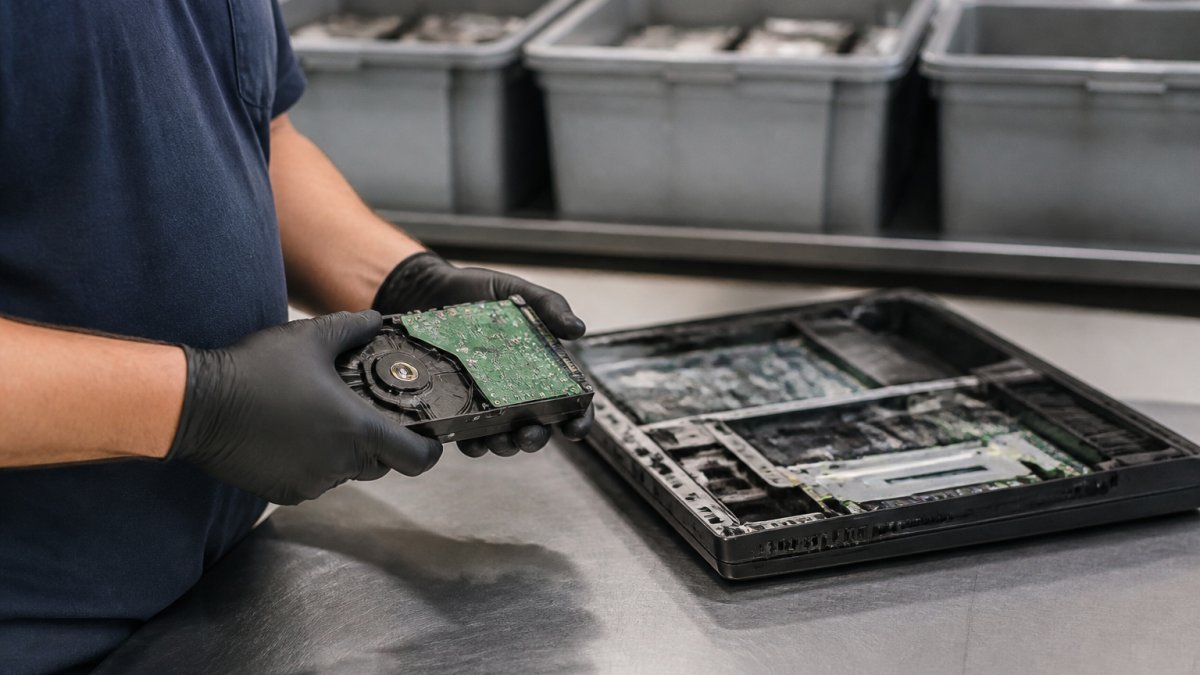
For a small business, the decision usually comes down to two questions. First, does the device hold regulated or customer data? Second, will the hardware be reused, resold, donated, or scrapped?
How Clear, Purge, and Destroy Differ in Practice
Clear is the weakest category. It relies on the drive’s firmware and standard commands to overwrite user-addressable storage.
Purge is stronger and includes cryptographic erase, block erase on flash media, and verified overwrite on magnetic media.
Destroy is the only category that does not depend on software behavior. For drives holding regulated data, destroy removes the verification question entirely: no residual media to test.
Device and Media Decision Guide
The table below is the decision guide we would use in a small office. It assumes the device holds data at the highest classification tier unless you have a documented reason to treat it otherwise.
| Media | Recommended method | Why |
|---|---|---|
| Spinning hard drives with regulated data | Destroy by shredding | Fast, verifiable, no software dependency |
| Spinning hard drives being reused internally | Purge, then verify | Preserves the asset for redeployment |
| Solid-state drives and NVMe | Destroy | Overwrite commands are unreliable on flash; wear-leveling and over-provisioning hide data |
| Self-encrypting drives with documented key destruction | Purge via cryptographic erase | Acceptable when key management is documented and the drive supports it |
| Copiers and multifunction printers | Destroy the internal drive | Frequently overlooked, often holds cached scans and print jobs |
| Phones and tablets | Purge via factory reset plus account removal | Confirm encryption was active and the device was enrolled in a management system |
| USB drives and removable media | Destroy or purge, depending on sensitivity | Cheap enough that destroy is usually the simpler choice |
| Virtual machines and cloud volumes | Purge via provider-supported crypto-shred or volume deletion | Confirm the provider’s process in writing; you cannot shred a cloud volume yourself |
Two rows deserve a note. Solid-state drives: many small teams assume a factory reset or vendor utility is enough, but on flash media the controller decides where data lives, and overwrite tools cannot reliably reach every cell, destroy is the defensible choice for regulated data. Managing these peripheral devices requires a structured approach to ensure no sensitive remnants persist, a process formalized in this office IT decommissioning checklist.
Cryptographic erase only counts as purge if you can prove the keys were destroyed. If key management was never documented, treat the drive as unpurged and destroy it.
When to Purge Instead of Destroy
Purge makes sense when the hardware has remaining useful life and the data classification allows reuse, a laptop reissued to a new employee, a server redeployed in a test environment, or a phone traded in.
Destroy makes sense at end of life, when data is regulated, or when verification costs exceed the device’s residual value. For most small businesses that describes the majority of retired drives: a twenty-person office retiring five-year-old laptops will usually find shredding cheaper than a verified, documented purge.
Verification After Sanitization
Whichever method you choose, the standard expects you to confirm the outcome. For clear and purge, that means a verification step: a post-sanitization scan, a vendor report, or a documented check that the drive no longer contains recoverable data. For destroy, verification means a certificate tying each serial number to a destruction event.
Building a Secure Data Destruction Policy Template
A secure data destruction policy template does not need to be long. Small teams structuring a disposal program can use our IT asset disposition guide for small business to lay out the program. It needs to name who decides, who executes, what evidence is kept, and how long it is retained.
Fill in these sections for your own organization:
- Scope: which device types and data classes this policy covers
- Roles: the asset owner, the disposal approver, and the person who signs the certificate
- Method selection: a reference to the decision table above, so staff do not improvise
Watch out: a policy that names no individual owner is the single most common reason disposal records go missing when an auditor asks.
What Belongs on a Data Destruction Certificate of Destruction
A certificate of destruction is your evidence that a specific device was sanitized by a specific method on a specific date. It should let an auditor trace one physical asset from your inventory to its end state without asking you questions.
At minimum, it should carry:
- Your organization’s name and the date of destruction
- Each device’s serial number and, where relevant, the asset tag from your own inventory
- The sanitization method used, stated in NIST terms, not vague language like “wiped”
What most certificates miss is serial-number-level detail. “Fourteen hard drives destroyed” is nearly useless in an audit; a list of fourteen serial numbers is defensible.
Verifying a Certificate Before You File It
A certificate is only as good as the process behind it. Before you file one, run a short verification pass:
- Match serial numbers to your inventory. Every device you released should appear, and no device should appear that you did not release.
- Check the method against your policy. If your policy says destroy for regulated drives, a certificate that says clear is a red flag.
- Confirm the standard is named. A certificate that does not reference NIST SP 800-88 or an equivalent standard is harder to defend.
- Look for the signer. A name, title, and contact method let you follow up if an auditor asks.
- Confirm residual material handling. If the certificate says the material was recycled, ask for the downstream documentation.
A common pattern is for vendors to issue a single certificate per pickup. That is fine as long as the certificate is itemized. If it is not, ask for an itemized attachment before the hardware leaves your site.
Internal Versus Vendor-Issued Records
If you sanitize internally, you are the issuer. Your record should include the same fields a vendor certificate would, plus the name of the operator and the tool or process used.
If you use a vendor, you need both the vendor’s certificate and your own internal record of the release. The internal record is what ties the certificate back to your inventory.
Store certificates and release records together, by date and by asset tag. When an auditor asks about a specific laptop, you want to pull one file, not search three systems.
How Long to Keep Destruction Records
Retention periods vary by regulator and by the data the device held; healthcare, financial, and consumer data each carry different expectations, and your legal counsel should set the period. A practical default is to keep destruction records for the same period you keep the underlying data records, plus a margin.
Once you have a certificate in hand, our guide to verifying data destruction certificates covers the checks worth running before you file it.
Vetting Your IT Asset Disposition and Recycling Partner
Ask three questions before you hand over hardware, and listen for specifics rather than assurances. First: what standard do you sanitize to, and can I see the method in writing? Second: what does your certificate contain, and can I see a sample? Third: what happens to the material after destruction, and can you report on it?
A partner who answers those in detail is usually a partner who has been through an audit themselves. When you are ready to choose, review Erecycler’s recycling, ITAD, and destruction services.
Erecycler’s recycling, ITAD, and destruction services include documented chain of custody for assets and hard drive shredding to the NIST 800-88 standard, plus sustainability metrics and diversion reporting. Manual device dismantling is part of the process.
If your team is staring at a storage room of retired laptops and no paperwork for the last three years, solve that now, before an audit or a breach forces the question. Erecycler brings 27 years of experience, documented chain of custody, NIST 800-88 hard drive shredding, and a zero-landfill commitment to programs built around your goals, from single laptops to large data center fleets. Get started with Erecycler and turn disposal from a liability into evidence you can hand an auditor. You can also request a hard drive and data destruction quote to start pricing your service.
Frequently Asked Questions
Does NIST 800-88 apply to small businesses?
NIST SP 800-88 is a voluntary guideline, not a law, so no agency fines you directly for skipping it. In practice it can become a requirement through other routes, such as contracts with larger clients or industry rules for sensitive data. Following its media sanitization steps gives you defensible evidence that sensitive data was destroyed, which is what auditors and customers ask for.
Does deleting files or formatting a drive meet NIST 800-88 guidance?
No. Deleting files or formatting a drive only removes the pointers to the data; recovery tools can still pull the contents back. NIST 800-88 treats those actions as inadequate for confidential information. You need a Clear, Purge, or Destroy method matched to the media, plus a record of what was done, by whom, and when, so the sanitization can be verified later.
When should a small business shred a hard drive instead of sanitizing it?
Choose physical destruction when the drive is failing, when you cannot verify that sanitization worked, when the media is embedded and hard to wipe cleanly, or when the data is sensitive enough that reuse is not worth the risk. Shredding to the NIST 800-88 standard removes any doubt. For healthy drives you plan to reuse, a verified Purge is usually enough and costs less.
What should a data destruction certificate of destruction include?
A useful certificate lists the asset identifiers such as serial numbers, the sanitization method used, the date and location of destruction, the name of the technician, and a statement that the data is unrecoverable. It should also reference the standard followed, such as NIST 800-88, and include chain-of-custody details. Keep these records for your audit trail; they are the compliance evidence regulators and clients ask to see.
How can a small business choose a secure electronics recycling provider?
Ask three questions. First, can they show documented chain of custody from pickup to destruction? Second, do they provide a certificate of destruction with serial-level detail and the method used? Third, how do they handle destruction, and can you see the process? A provider that shreds to NIST 800-88 standards, gives you written proof, and explains where the material ends up is the one to trust with sensitive hardware.
