Table of Contents
- Why Multisite ITAD Projects Fail Without a Central Operating Model
- What a Multisite IT Asset Disposition Project Plan Must Include
- Building a Multisite IT Asset Inventory Template
- Site Readiness, Consolidated Scheduling, and Pickup Logistics
- Data Sanitization and ITAD Chain of Custody Across Locations
- ITAD Vendor Selection for Multi-Location Programs
- Program-Level KPIs and Multisite Reconciliation
- Frequently Asked Questions
Last Updated: October 14, 2026
Why Multisite ITAD Projects Fail Without a Central Operating Model
Managing multisite IT asset disposition projects breaks down when every location runs its own playbook. The result is missing serial numbers, gaps in your chain of custody, and an audit you cannot pass.
IT asset disposition is the process of retiring, sanitizing, and responsibly recycling or reselling end-of-life IT equipment.
The fix is an operating model, not more effort.
A central operating model gives you one project plan, one inventory format, one evidence standard, and one schedule. Local teams execute. Headquarters controls the rules.
Below, we break down exactly how to build that model, from the project plan to program-level KPIs.
Multisite ITAD fails for organizational reasons, not technical ones. Standardize the plan, the inventory, and the evidence before you touch a single asset.
What a Multisite IT Asset Disposition Project Plan Must Include
A multisite IT asset disposition project plan is the master document that defines phases, owners, decision rights, and contingency rules for every location. It replaces site-by-site improvisation with a repeatable process.
Every plan needs four things:
- A phase map: assessment, scheduling, collection, sanitization, reporting
- A named owner per site and one program owner
- Decision rights: who approves scope changes and exceptions
Phases, Owners, and Decision Rights
Keep the phase list short. Long phase lists stall.
| Phase | Site Owner | Program Owner Decides |
|---|---|---|
| Asset inventory and assessment | Site IT lead | Inventory format and scope |
| Site readiness check | Facilities lead | Go / no-go per site |
| Collection and logistics | Site IT lead | Carrier and pickup windows |
| Data sanitization | Vendor | Method and evidence standard |
| Reconciliation and reporting | Program owner | Final sign-off |
The site owner executes. The program owner sets the standard. When a site wants to deviate, the program owner decides, not the site.
Contingency Planning for Sites That Slip
Sites slip. A data center migration runs late. A lease deadline moves. A facilities contact leaves.
Build two rules into the plan:
- Every site has a backup pickup window already approved
- Every site has a named alternate contact
If a site misses its window, the program owner reschedules from a pre-approved list. No new approvals, no delay.
The most common failure we see is letting each site pick its own recycler. That fragments your chain of custody, and you cannot produce one clean audit trail when regulators ask.
Building a Multisite IT Asset Inventory Template
A multisite IT asset inventory template is a single spreadsheet or database schema that every location uses to record assets before pickup. One format means reconciliation is possible.
Fields That Make Reconciliation Possible
Most inventory templates miss the fields that matter. Include these:
- Site ID and building name
- Asset type and manufacturer
- Serial number (never skip this)
The serial number is the anchor. Without it, you cannot match what left a site to what arrived at the vendor.
NIST SP 800-88 Guidelines for Media Sanitization defines the sanitization methods your inventory should reference, so add a column for the method applied per asset.
Lock the template. Version it. Any change goes through the program owner.
Site Readiness, Consolidated Scheduling, and Pickup Logistics
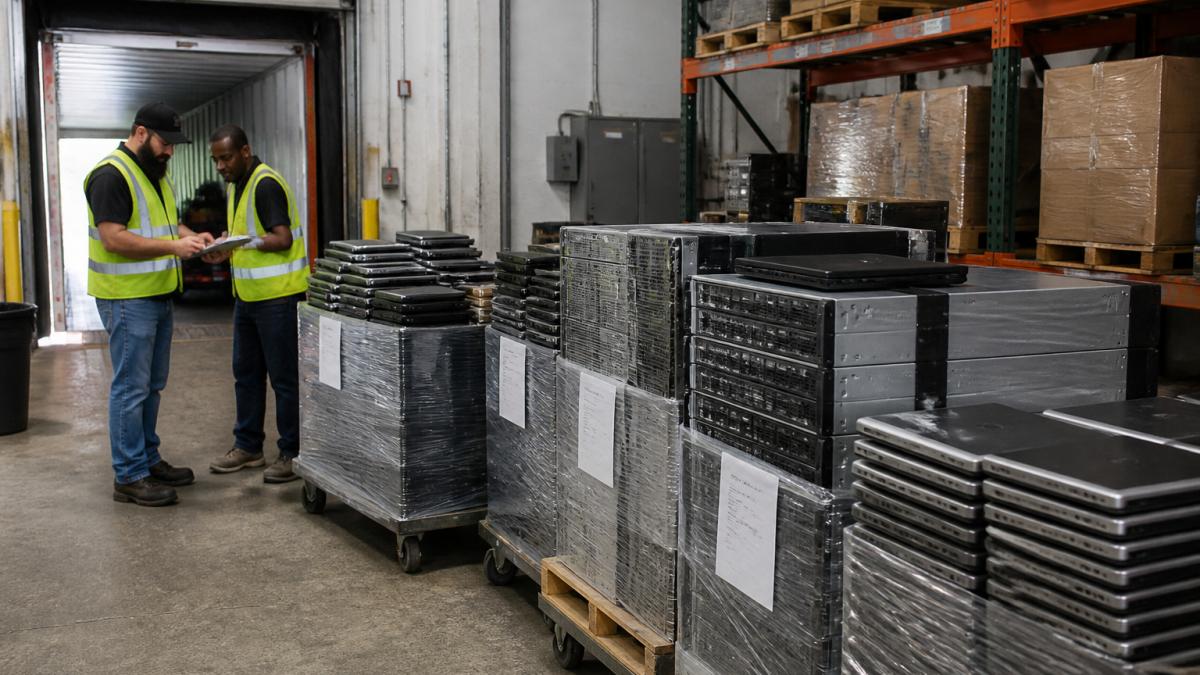
Site readiness and consolidated scheduling are what separate a smooth multisite project from a chaotic one. Group pickups by region and week, not by site request.
Run a Site Survey Before You Schedule Anything
A site survey is a 30-45 minute walkthrough with the site IT lead and the facilities lead. It produces a one-page readiness record that the program owner can compare across locations. Capture these items every time:
- Access: dock or ground-level door, door width, elevator dimensions, stair count, and whether a freight elevator needs to be reserved
- Loading area: whether a tractor-trailer can reach the dock, or whether you need a box truck or liftgate
- Operating hours: receiving window, security desk check-in rules, and any badge or escort requirement
Score each site green, yellow, or red. Green sites go on the first route wave. Yellow sites get a remediation task with an owner and a due date. Red sites are held out of the schedule until the blocker clears. This is the same logic a project manager would use for a construction punch list, and it prevents a single unprepared site from stalling a whole route.
Sequence Pickups by Route Wave, Not by Request
Once sites are scored, build route waves. A route wave is a group of sites in the same metro area or along a single corridor that one carrier can cover in one or two days. Practical rules:
- Cap each wave at the number of stops a single truck can complete in a shift, accounting for dock time, not just drive time
- Put the highest-volume site first in the wave so a delay there does not cascade into every later stop
- Keep a buffer stop or a half-day of slack in each wave for the site that runs long
Consolidating by wave typically reduces cost per pickup because you are paying for one route instead of many individual trips. It also makes the schedule predictable, which matters when site leads are juggling the pickup against other work.
Handle Delays Without Breaking the Program
Delays are normal. A data center migration runs late, a lease deadline moves, or a facilities contact leaves. Build two rules into the plan:
- Every site has a pre-approved backup pickup window already on the calendar
- Every site has a named alternate contact who can authorize the pickup
If a site misses its window, the program owner reschedules from the pre-approved list. No new approvals, no renegotiation, no delay to the rest of the wave. If a site slips twice, escalate to the program owner and consider moving it to a later wave rather than holding the current one.
Require a signed readiness checklist before each pickup. Sites that skip the checklist cause delays for everyone else on the route, and the signature gives you a clean record of who confirmed readiness.
:::
Data Sanitization and ITAD Chain of Custody Across Locations
Data sanitization and ITAD chain of custody are the two controls auditors care about most. Sanitization destroys the data.
Use one evidence standard across every location:
- A signed pickup record per site
- Serial-level tracking from pickup to destruction
- A certificate of destruction per batch
Hard drives should be shredded to the NIST 800-88 standard rather than wiped, because shredding gives you a physical destruction record that holds up in an audit.
For regulated industries, EPA guidance on electronics recycling also shapes how you document end-of-life handling and environmental compliance.
The goal is one audit trail. If a regulator asks where a specific serial number went, you should answer in minutes, not days.
ITAD Vendor Selection for Multi-Location Programs
ITAD vendor selection for a multi-location program comes down to one question: can this vendor give you the same documented process at every site? If not, you will manage the gaps yourself.
Questions to Ask Before You Sign
Ask these before you commit:
- Can you provide serial-level chain of custody across all our sites?
- Do you shred to NIST 800-88, and do you certify it?
- Can you produce diversion and zero-landfill reporting?
A vendor that cannot answer all five in writing is a risk. At Erecycler, we provide documented chain of custody for every asset.
Ask for a sample certificate of destruction and a sample chain-of-custody report before you sign. If the vendor cannot produce both on request, that tells you how the project will go.
Program-Level KPIs and Multisite Reconciliation
Program-level KPIs and multisite reconciliation turn a pile of site reports into one clear picture. Track the same numbers at every location so you can compare and correct. The unique angle here is defining each metric precisely enough that two different sites produce a comparable number, and pairing every KPI with a reconciliation step.
Define Each KPI So Sites Are Comparable
A KPI is only useful if every site calculates it the same way. Write the definition down and put it in the project plan.
| KPI | Definition | Target Direction |
|---|---|---|
| Inventory accuracy | Serial numbers matched to assets on the vendor receipt, divided by total serials shipped | Higher |
| Pickup completion | Scheduled pickups completed within the approved window, divided by total scheduled | Higher |
| Processing turnaround | Calendar days from pickup to certificate of destruction | Lower |
| Data destruction completion | Assets with a certificate on file, divided by total data-bearing assets | 100% |
| Value recovery | Residual value returned, divided by estimated residual value at survey | Higher |
| Cost per asset | Total program cost, divided by total assets processed | Lower |
| Diversion rate | Equipment kept from landfill, divided by total equipment processed | Higher |
| Chain-of-custody completeness | Batches with a full evidence package, divided by total batches | 100% |
Two definitions matter most. Inventory accuracy uses the vendor receipt as the source of truth, not the site’s own count, so a site cannot inflate its number. Processing turnaround starts at pickup, not at the site’s internal staging date, so slow sites are not rewarded for staging early.
Reconcile Monthly, Site by Site
Reconciliation is the step that makes the KPIs trustworthy. Run it on a fixed monthly cadence, and do it the same way every time:
- Pull the site inventory export for the month.
- Pull the vendor receipt for the same batch.
- Match on serial number, not on asset tag or model.
- Flag every serial that appears on one side but not the other.
- Classify each exception: untagged asset, missing asset, duplicate serial, or data entry error.
- Assign an owner and a due date to every open exception.
- Close the month with a signed reconciliation record.
Untagged assets are the most common exception. A device that left the site without a serial number in the register cannot be matched, so it becomes an open item until the site can identify it from photos, purchase records, or the vendor’s intake log. Missing assets are more serious, they usually mean a device was removed from the staging area, shipped on a different batch, or never inventoried at all.
Report Exceptions Consistently Across Sites
Use one exception log format for every location. Each entry needs the site ID, serial number, exception type, date discovered, owner, and status. A shared log lets the program owner see patterns, for example, one site repeatedly shipping untagged devices, or one carrier consistently short on receipts, that a per-site report would hide.
Review the Dashboard on a Fixed Cadence
One dashboard, one format, one owner. Review it monthly with site leads and quarterly with leadership. When a site drifts, you catch it in the monthly cycle, not at the audit. The dashboard should show each KPI by site and as a program total, so a strong site cannot mask a weak one.
Comparable KPIs plus a monthly reconciliation cycle are what turn site-level reports into program-level control. Define the metric, match on serial number, log every exception, and review on a fixed cadence.
Frequently Asked Questions
How do you manage IT asset disposition across multiple locations?
Run it as one program with a single owner, not as separate local projects. Standardize the asset inventory fields, the data destruction standard, and the evidence pack every site must produce, then let each site handle its own readiness and staging. Central coordination handles consolidated pickup scheduling, vendor management, and reconciliation of what left each site against what arrived at the processing facility. That structure keeps chain-of-custody records consistent across every location.
What should a multisite ITAD project plan include?
At minimum: a site list with readiness status, an asset inventory template with serial number fields, a defined data destruction standard such as NIST 800-88, pickup scheduling windows per site, named site contacts, and a reconciliation step that closes the loop after processing. Add a contingency section for sites that miss their window, because one delayed location can break a consolidated truck route and push costs onto the rest of the program.
How do you ensure secure data destruction at every site?
Set one destruction standard for the whole program and require the same documentation from every location. Hard drives shredded to NIST 800-88 give you a defensible baseline, and each site should receive a certificate of destruction tied to specific serial numbers rather than a batch-level summary. Where drives cannot be shredded on site, they move under documented chain of custody to a processing facility, with signed handoff records at each transfer point.
What metrics should teams use to evaluate a multisite ITAD project?
Track inventory accuracy (assets received versus assets on the original register), processing turnaround per site, certificate of destruction coverage, and value recovery or diversion totals. Site-level metrics expose which locations are slowing the program down, while program-level totals support sustainability reporting and cost control. Reconciliation variance is the one to watch closest, since unexplained gaps between what left a site and what arrived are the first sign of a chain-of-custody problem.
Multisite ITAD gets messy fast when every location runs its own process. Erecycler builds one operating model for your whole portfolio, with NIST 800-88 hard drive shredding, documented chain of custody for every asset, and zero-landfill diversion reporting your sustainability team can use. With 27 years of experience and 112,000+ clients served, we handle everything from a single site to a multinational data center footprint.
Let’s build your program.